Pinball FX3
Edit date: 2-07-2024, 18:09
Reason: + update 09.12.2021 - 10.03.2022

- Category:
- Release date:
- Game Genre:Arcade, pinball
- Developer:
- Release:ElAmigos
- Platform:PC
- Languages (subtitles):English, French, Italian, German, Spanish
- Dubbing/Audio:English
- Crack:Codex
- Game size:6.82GB
Game Description
Pinball FX3 on PC is now listed as Pinball FX Classic on Steam, a free-to-play digital pinball simulator from Zen Studios. The original name still drives substantial search interest because the game retains its classic table library, competitive features, and cabinet-focused ecosystem, while Steam continues to offer the base application and downloadable table content.
What Pinball FX Classic Actually Is
At its core, Pinball FX Classic is a collection of virtual pinball tables viewed from a 3D top-down perspective. The playfield follows familiar physical-pinball rules: launch the ball, control the flippers, protect the outlanes, activate table objectives, and build a high score before the ball drains.
The important distinction is that each table has its own ruleset rather than functioning as a simple reskin. Targets, ramps, missions, multiball sequences, timed objectives, moving toys, and bonus features change the rhythm of play. A licensed table such as Star Wars Pinball approaches scoring differently from a Williams recreation or a Zen Studios original.
Players can approach the game casually with short classic sessions or treat each table as a long-term mastery project. Learning the safest shots is only the beginning. Strong play depends on shot control, ball saves, nudging, combo routes, multiball timing, and knowing when to take a risky shot for a larger reward.
Modes Built Around Practice and Competition
Pinball FX Classic is more than a traditional three-ball score attack. Its single-player structure includes classic table play alongside challenge formats designed to test specific skills and create faster, more focused sessions.
- Classic play for conventional score chasing and table mastery.
- One Ball Challenge rules that put maximum pressure on a single ball.
- Five Minute Challenge sessions built around scoring as much as possible within a time limit.
- Survival Challenge play where the pressure increases as the run continues.
- Practice mode for learning table layouts, objectives, and shot sequences.
- Hotseat multiplayer for taking turns on the same PC.
The competitive layer is one of the game’s defining features. Steam supports multiplayer functionality, while Zen Studios built Pinball FX Classic around multiplayer matchups, user-created tournaments, leagues, leaderboards, and asynchronous competition. That structure gives experienced players a reason to return even after they have learned the major rules of a table.
For players who want a more traditional simulation feel, the important choice is between the game’s available physics and table modes. Some tables offer different physics options, while the broader table library reflects the handling model associated with Zen’s earlier pinball releases. This means the same general control scheme can feel noticeably different from one table to the next.
Licensed Tables and Table Design
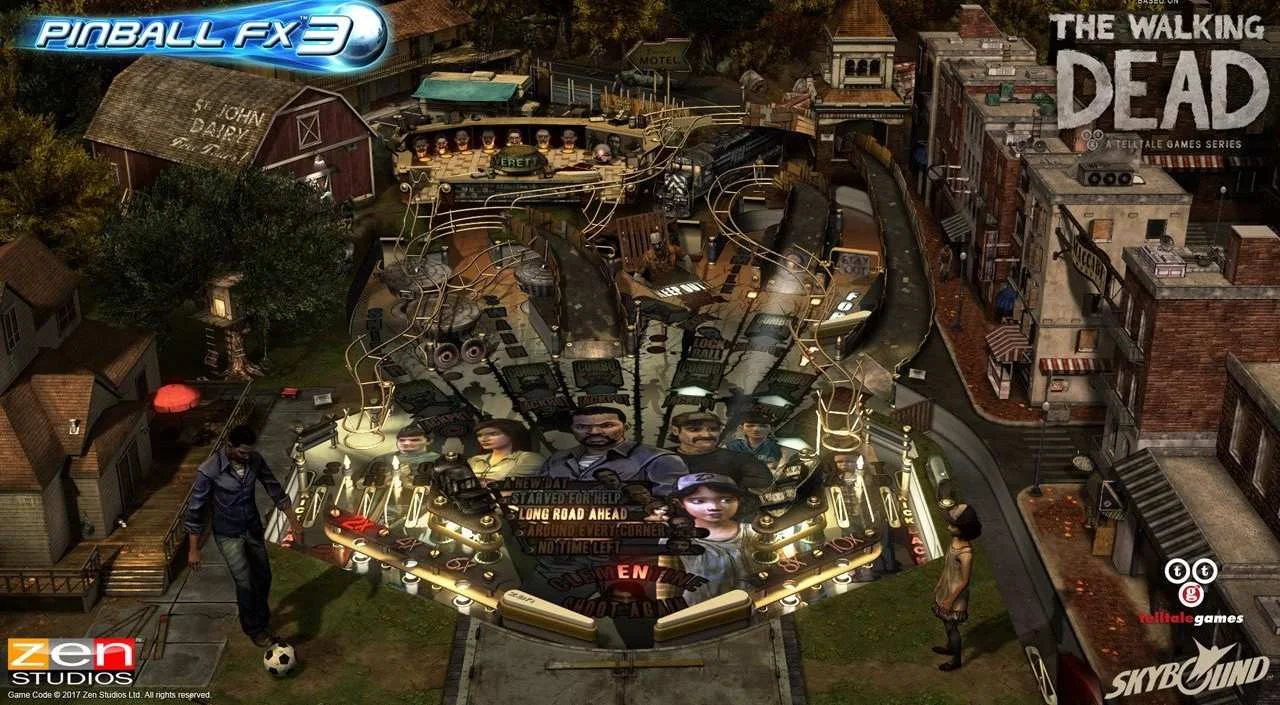
Zen Studios’ library mixes original designs with licensed properties and authentic recreations. The catalog includes tables connected to Williams Pinball, Marvel, Star Wars, Universal, Bethesda, South Park, Jurassic Park, Portal, The Walking Dead, and other recognizable brands.
Williams tables are particularly important for players who want recreations of established physical machines. Their value comes from recognizable layouts, rule systems, sound design, and table behavior rather than from a conventional campaign. Zen originals take more creative liberties, adding fantasy settings, unusual toys, cinematic events, and rules that would be difficult to reproduce on a physical machine.
Every table should be treated as its own compact game. A useful first step is to study the table guide, identify the main objectives, and practice the shots that begin missions or multiball. The game rewards players who learn the rules instead of repeatedly flipping at random.
Free Base Game, Paid Table Collection
Pinball FX Classic uses a free base game with additional tables sold as downloadable content. The application provides access to the platform and its shared features, but the full table library is built from separately purchased packs and individual content.
This content model is easy to misunderstand because the game can appear as one large collection while ownership is divided across many table packs. Players interested in Marvel, Star Wars, Williams, or Zen Originals should check each pack’s included tables before buying. Older purchases from compatible Zen pinball products may also be importable on the same platform when the relevant content is supported.
For PC players, the Steam version is the most relevant edition because it preserves the game’s cabinet infrastructure and continues to list downloadable content under its current Pinball FX Classic name. Zen Studios has stated that classic tables remain playable and that online services continue, although new content production has moved to the newer Pinball FX platform.
Cabinet Mode Is the Major PC Differentiator
The strongest reason to choose the PC version is Cabinet Mode. This feature is designed for custom virtual pinball cabinets and multi-display setups, but it is also useful for players using a portrait-oriented monitor.
Cabinet Mode supports playfield rotation, a separate dot-matrix display, and a configurable backglass window. Owners can position and resize these elements across multiple displays, creating a layout closer to a physical machine. Zen’s documentation also describes compatibility with real DMD hardware through the appropriate community tools.
Cabinet Mode is specific to the Steam version of Pinball FX3, now Pinball FX Classic, and the in-game authentication requirement was removed in a Steam update. Commercial cabinet use remains subject to Zen Studios’ own requirements, but ordinary players do not need to obtain an activation code to use the feature.
Beyond cabinet support, Steam lists full controller support, Steam Cloud, achievements, Family Sharing, and Remote Play features. The game requires the Steam client, and online leaderboards and multiplayer functions depend on the platform’s connected services. The interface is available in English, French, Italian, German, and Spanish, with English full audio listed for the Steam edition.
Who Should Play It?
Pinball FX Classic is a strong fit for players who enjoy score attacks, competitive leaderboards, licensed arcade machines, and games that reward repeated practice. It is especially appealing to virtual pinball fans building a dedicated cabinet or using a vertical monitor at a desk.
It is less suitable for anyone expecting a story campaign, character progression, or a single unified adventure. The progression loop is table-based: learn the rules, improve your control, complete challenges, raise your score, and compete against other players.
Players who prefer a more museum-like collection of historic machines may also want to compare it with authentic real-table recreations such as The Pinball Arcade. Pinball FX Classic places more emphasis on licensed entertainment properties, competitive systems, and Zen’s own stylized designs.
Similar PC Pinball Games
The closest alternatives depend on whether you value realism, table quantity, or novelty. Retro-focused pinball simulation like Zaccaria Pinball is a natural comparison for players interested in classic machine history, realistic table behavior, and a large catalog.
For a lighter arcade approach, compact arcade pinball collections such as Pinball Deluxe Reloaded offer themed tables with simpler presentation and a more immediate pick-up-and-play structure. Pinball FX Classic sits between those extremes: it offers accessible arcade controls, but its best tables have deep rules and competitive scoring routes.
Pinball FX Classic FAQ
Is Pinball FX3 still called Pinball FX3 on Steam?
No. On Steam, the game is currently called Pinball FX Classic. It was formerly known as Pinball FX3, so both names remain relevant when searching for the game, its community information, and its downloadable table content.
Is Pinball FX Classic free to play?
Yes. The base application is free, while additional tables and table packs are sold separately. The game is therefore free to enter but not a complete representation of the full licensed library.
Does Pinball FX Classic support multiplayer?
Yes. It includes competitive multiplayer features, online matchups, tournaments, leagues, leaderboards, and local hotseat play. The exact experience depends on the selected table and the relevant online services.
Does the PC version support virtual pinball cabinets?
Yes. The Steam edition includes Cabinet Mode with playfield rotation, configurable DMD and backglass windows, multi-display positioning, and support for cabinet-oriented layouts.
Does Pinball FX Classic include every Pinball FX table?
No. Pinball FX Classic and the newer Pinball FX are separate platforms with different table libraries and content ownership. Classic tables remain available in Pinball FX Classic, while newer table production is associated with Pinball FX.
Is Pinball FX Classic a campaign game?
No. Its progression is based on table mastery, challenges, personal scores, leaderboards, tournaments, and collection building rather than a story campaign with a fixed ending.
System Requirements
Minimum: |
Processor: Dual Core 1.66 GHz Graphics: 1 GB GeForce 450 Memory: 4 GB RAM Disk space: 1 GB HDD Operating system: Windows XP/7/8 |
Screenshots



Trailer/Gameplay
Download
Pinball FX3 (2017), 6.82GB
ElAmigos release, game is already cracked after installation (crack by Codex).

Updated till 09.12.2021; 34 DLC / 99 tables are included.

1. Extract files.
2. Burn or mount the image.
3. Install the game.
4. ElAmigos release, game is already cracked after installation.
5. Play the game. If you like this game, BUY IT!
Pinball FX3 Download
🔒 Premium access required
To see and use the download links, you must be logged in and have an active PREMIUM account.
* Unlock downloads via Torrent and TeraBox.
+ update 09.12.2021 - 10.03.2022 & crack (by Codex/CS), 155MB
🔒 Premium access required
To see and use the download links, you must be logged in and have an active PREMIUM account.
* Unlock downloads via Torrent and TeraBox.
Torrent Download
The best torrent download speeds are with qBittorrent!