Farm Together 2
- Category:
- Release date:
- Game Genre:Simulation, TPP, Economic, Farm, For 2 Players, Indie Games, Co-op, Splitscreen, Multiplayer, Singleplayer, Internet
- Developer:Milkstone
- Release:ElAmigos
- Platform:PC
- Languages (subtitles):English, French, Italian, German, Spanish, Polish, Czech, Russian, Hungarian, Dutch, Danish, Portuguese, Portuguese-Brazil, Ukrainian, Turkish, Arabic, Chinese Simplified, Japanese, Korean, Thai, Vietnamese, Croatian
- Crack:Codex/Rune
- Game size:0.49GB
Game Description
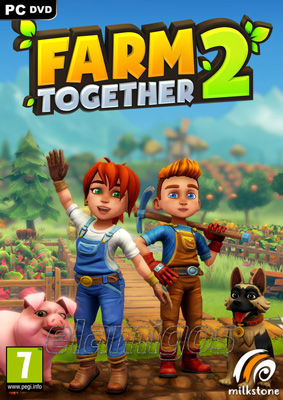
Farm Together 2 on PC is a third-person farming and life simulation sandbox from Milkstone Studios, built around relaxed cultivation, decoration, progression, and cooperative farm management. The current Steam storefront still uses the name Farm Together 2; it is a separate sequel to Farm Together, not a rebrand of the original game.
A Farming Loop Built Around Progress
The opening is deliberately simple. You begin with a small plot, plant crops, grow trees, care for animals, and sell the results through the nearby town. Earnings and progression unlock more land, buildings, production options, decorations, and customization items.
Unlike story-led farming RPGs, Farm Together 2 is organized around a persistent routine rather than a fixed campaign. The main loop is to prepare land, wait for resources to mature, harvest them, complete town requests, reinvest the rewards, and redesign the farm as new options become available.
Time continues while you are offline, so returning to the game is part of the intended rhythm. Crops and other activities can advance between sessions, giving the game a useful structure for short visits as well as longer building sessions.
The systems are forgiving. Farm Together 2 focuses on steady expansion and personal organization instead of combat, severe failure states, or punishing deadlines. That makes it accessible to players who want a farming game that can be played without constant optimization.
Tractors, Town Requests, and Farm Management
The tractor is one of the sequel's most practical additions. After unlocking the garage in town, you can use it to cover more ground and speed up repetitive work. Fuel replenishes over time, while fuel depots help keep the vehicle useful during longer farming sessions.
Automatic tractor mode lets the vehicle perform several routine actions while moving through prepared areas. Depending on the task and available setup, it can help with planting, watering, harvesting, and related field work, reducing the amount of repeated manual input on larger farms.
The town gives the farm economy a clearer destination. You can sell harvested goods, upgrade town shops, and fulfill requests from townspeople for additional rewards. This creates a light management layer without turning the game into a strict production-chain simulator.
Later progression includes more specialized resources and facilities. Updates have expanded the available systems with items such as herbs, fabric, minerals, production buildings, shop upgrades, and farmhands, giving established farms more ways to organize their work.
Players who prefer more realistic equipment, field operations, and agricultural management may find a sharper simulation focus in large-scale farming simulators such as Farming Simulator 25. Farm Together 2 is intentionally lighter and more immediately approachable.
Terraforming and Creative Customization
Farm Together 2 treats the farm as both a productive space and a long-term design project. You can place fences, roads, buildings, facilities, and decorations to create organized fields, themed neighborhoods, animal areas, or purely decorative landscapes.
The sequel adds a simple terraforming system that allows players to raise or remove hills and mountains. This gives the farm more visual structure than a flat arrangement of plots and makes large-scale landscaping part of the progression loop.
Customization also extends beyond the land. You can change the appearance of your avatar, tractor, and other visible farm elements. These options matter because visiting another player's farm is not just a cooperative activity; it is also a way to compare layouts and decoration choices.
Your house provides a separate interior space to develop. The interior can be decorated, while activities such as cooking recipes and painting offer a change of pace from field work. These features remain optional, so players can focus on farming, design, or a mixture of both.
Co-Op Without Losing Farm Ownership
Farm Together 2 supports single-player farming, online cooperation, shared or split-screen co-op, and cross-platform multiplayer. Steam also lists Remote Play Together, which gives PC players another way to share a local-style session.
Each player manages their own persistent farm. Friends visit that farm to help with planting, harvesting, animal care, construction, and decoration rather than joining a separate campaign map with a disposable save.
Farm permission controls let the host decide whether the farm is private, limited to friends, or open to public visitors. The host can also restrict what visitors are allowed to change, which is important when a farm contains carefully planned layouts or expensive decorations.
Split-screen play is supported on PC, including split-screen sessions on online farms. The arrangement is best suited to players with additional controllers, while Steam Remote Play Together can extend the same local-cooperative idea to remote players.
There is no dedicated-server ecosystem for leaving a farm permanently available without its owner. The structure remains host-based, so the player who owns the farm is central to its ongoing availability.
Base Game and Optional Content Packs
Farm Together 2 is a paid game with its core farming, town, cooperative, progression, housing, landscaping, and customization systems included in the base release. The main experience does not depend on a free-to-play economy.
The current Steam catalog lists six themed content packs alongside a separate soundtrack item: Explorer Pack, Meadow Pack, Gothic Pack, Frosty Pack, Cyber Pack, and Zen Pack.
These add-ons are primarily themed customization expansions rather than traditional story campaigns. They broaden the available visual style with additional decorations, clothing, vehicles, buildings, and related farm items.
That content model keeps the purchase decision straightforward. Players who want the core farming sandbox can use the base game, while long-term decorators and completion-minded players can add themed packs as desired.
Who Should Play Farm Together 2?
Farm Together 2 suits PC players who want a low-pressure farming sandbox with visible long-term progress. It is especially well suited to couples, families, and friend groups that prefer shared construction and routine tasks over combat or competitive objectives.
The game also works for solo players who enjoy decorating, organizing production areas, and gradually unlocking a larger catalog of objects. Its offline progression makes it easy to alternate between active farming and short return visits.
Players seeking romance systems, deep character relationships, dungeon exploration, or a dramatic narrative should look elsewhere. Farm Together 2 keeps the focus on land development, resource collection, town commerce, and cooperation.
Those who want animal care combined with first-person ranch construction and hunting may prefer hands-on ranch management in Ranch Simulator. Farm Together 2 is more colorful, more relaxed, and more focused on accessible shared farming.
For players who want farming joined to community development, crafting, exploration, and a stronger life-simulation structure, cooperative prehistoric farming and village building in Roots of Pacha provides a more character-driven alternative.
PC Features and Localization
The PC version supports keyboard and mouse as well as full controller play. Steam lists Steam Cloud, Steam achievements, Steam trading cards, Remote Play Together, Family Sharing, shared or split-screen co-op, and cross-platform multiplayer.
Farm Together 2 is also marked as Steam Deck Verified, making controller-first play and portable farm visits part of the PC ecosystem. The interface can be adjusted for readability on smaller screens.
The Steam interface supports 24 languages, including English, Spanish, French, German, Italian, Portuguese, Portuguese-Brazil, Russian, Polish, Dutch, Japanese, Korean, Simplified Chinese, Traditional Chinese, Turkish, Ukrainian, Arabic, Thai, Vietnamese, Czech, Croatian, Hungarian, Danish, and Catalan.
Steam is the relevant PC launcher for the storefront version. No separate dedicated-server tools or mod ecosystem are presented as core PC features, so the main appeal comes from controller support, cloud saves, Remote Play, co-op, and the persistent farm structure.
Farm Together 2 FAQ
Is Farm Together 2 a rebrand of Farm Together?
No. Farm Together remains the original game name, while Farm Together 2 has its own separate storefront listing and sequel identity. The current branding does not indicate a rename of the first game.
Is Farm Together 2 single-player or co-op?
Both options are supported. You can manage a farm alone, invite friends online, play shared or split-screen co-op, and use Steam Remote Play Together.
Does Farm Together 2 have cross-platform multiplayer?
Yes. Steam lists cross-platform multiplayer, and Milkstone Studios also identifies cross-play and cross-save among the sequel's supported platform features.
Does the farm progress while I am offline?
Yes. Time continues to advance while you are away, allowing crops and other farm activities to progress between sessions.
What does the base game include?
The base game includes farming, animal care, town commerce, tractor use, progression, terraforming, house decoration, avatar customization, and cooperative play. Optional themed packs expand the decoration and customization catalog rather than adding separate campaigns.
Does Farm Together 2 support controllers on PC?
Yes. You can play with keyboard and mouse or a controller, and the PC version supports shared or split-screen co-op with additional controllers.
Is there a story campaign or fixed ending?
No traditional campaign or fixed ending defines the game. Its structure is an open-ended progression loop built around unlocking items, expanding the farm, completing town requests, hosting visitors, and refining the layout over time.
System Requirements
Minimum: | Recommended: |
| Processor: Dual Core processor Graphics: DirectX 11 capable hardware Memory: 4 GB RAM Disk space: 2 GB available space Operating system: Windows 7 64-bit or newer | Processor: Quad core processor Graphics: GeForce 1060 or better Memory: 8 GB RAM Disk space: 2 GB available space Operating system: Windows 10 or newer |
Screenshots


Trailer/Gameplay
Download
Farm Together 2 (2025), 0.49GB
ElAmigos release, game is already cracked after installation (crack by Codex/Rune).

Updated till 15.10.2025.

1. Extract files.
2. Burn or mount the image.
3. Install the game.
4. ElAmigos release, game is already cracked after installation.
5. Play the game. If you like this game, BUY IT!
Farm Together 2 Download
🔒 Premium access required
To see and use the download links, you must be logged in and have an active PREMIUM account.
* Unlock downloads via Torrent and TeraBox.
DLC: Meadow Pack, Explorer Pack.
Torrent Download
The best torrent download speeds are with qBittorrent!