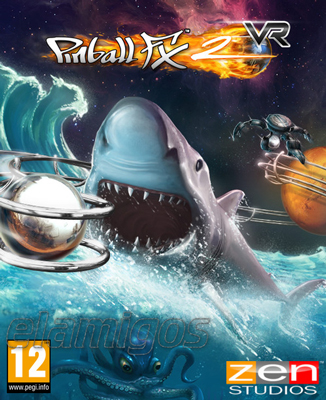
Pinball FX2 VR
Game Description
Pinball FX2 VR PC is a virtual-reality pinball simulation from Zen Studios, but the current Steam storefront name is Pinball FX Classic VR. The game places the player inside an interactive virtual pinball space, combining physics-based table play with animated environments, score tracking, achievements, and tracked-controller support. It is a focused solo score-attack experience rather than a campaign-driven VR game.
The name change is important when searching for the PC version. Steam now lists the application as Pinball FX Classic VR, while Pinball FX2 VR remains the legacy name used by older pages, player discussions, and existing catalog references.
Inside the virtual pinball machine
Pinball FX Classic VR uses a first-person VR presentation that places the player beside the table instead of behind a conventional flat-screen camera. You launch the ball, operate the flippers, control the plunger, and read the playfield from a close physical perspective.
The central loop is traditional pinball: keep the ball alive, route it toward ramps and targets, activate table features, and build a stronger score before the ball drains. The difference is the surrounding presentation. Animated table environments, moving props, visual effects, and spatial scale make the machines feel like objects occupying the same room as the player.
The physics model is designed around precise flipper control, ball momentum, rebounds, lanes, bumpers, ramps, and table-specific behavior. This is not a character-progression game with equipment or skill trees. Improvement comes from learning the geometry of each playfield, recognizing scoring opportunities, and reducing mistakes during repeated attempts.
Players who enjoy the broader licensed-table ecosystem of modern themed PC pinball collections such as Pinball FX should understand that the VR edition is a separate application with its own table lineup and ownership structure.
Base tables and their different identities
The base game includes three original Zen Studios tables: Secrets of the Deep, Mars, and Epic Quest. Each table uses a different theme and rule structure, so the collection is better understood as three separate score-attack challenges than as one interchangeable experience.
- Secrets of the Deep builds its identity around an underwater adventure theme and sea-monster imagery.
- Mars uses a science-fiction setting with a planetary exploration tone.
- Epic Quest adds fantasy elements and achievement-focused table objectives.
The themes change the atmosphere, but the deeper difference comes from table rules. A successful run depends on identifying valuable lanes, managing ball returns, triggering modes, and deciding when a risky shot is worth attempting. The mastery loop is highly repeatable: learn the layout, improve control, reach more table features, then return to challenge the score again.
DLC and content model
Pinball FX Classic VR is a paid base game with optional paid table content. The base package includes the three original tables, while the current Steam catalog lists three separate add-ons and an Ultimate Bundle pairing the base game with the Season 1 Pack.
The Season 1 Pack adds five tables: CastleStorm, Wild West Rampage, BioLab, Paranormal, and Earth Defense. Their themes range from medieval siege action and western showdowns to laboratory experiments, supernatural investigation, and alien invasion.
Universal Classics Pinball adds three licensed tables based on Back to the Future, Jaws, and E.T. the Extra-Terrestrial. The separate The Walking Dead table uses locations and themes associated with the Telltale adaptation, including the St. John’s Dairy Farm, Travelier Motel, Bell Tower, train crossing, and RV.
This means the complete current Steam DLC lineup contains eight additional tables beyond the base game. The commercial structure is straightforward, but players should not assume that tables from the flat-screen Pinball FX catalog automatically transfer to this older VR application.
Score attack, achievements, and competition
There is no conventional story campaign, open-world progression, or character build. The long-term structure is built around table mastery, personal records, Steam Achievements, table statistics, and global leaderboards.
The game tracks more than a single final number. Steam describes scoreboards covering Super Score, Wizard Score, table statistics, and other performance data. These systems give experienced players specific targets beyond simply keeping the ball in play.
Pinball FX Classic VR is primarily a single-player game. The current Steam feature panel lists single-player support, tracked controllers, Steam Cloud, Steam Leaderboards, Steam Achievements, Family Sharing, and VR-only presentation. It does not present online co-op, simultaneous competitive multiplayer, or split-screen play as core features.
The practical multiplayer-adjacent experience is leaderboard competition. Players compare scores across the same tables and return to improve their ranking, but the PC storefront should not be read as promising a shared-ball multiplayer mode.
PC VR features and controls
The PC version is distributed through Steam and requires a SteamVR-compatible setup. It is marked VR Only, so it is not a flat-screen pinball game with an optional headset mode. A headset and tracked motion controllers are central to the intended experience.
Steam lists Tracked Controller Support, allowing the flippers and other table interactions to be handled through VR controllers. The game is built for seated or standing virtual pinball play, although comfort and table height can depend on the player’s room setup and headset calibration.
Steam Cloud synchronizes supported data, while Steam Achievements and Steam Leaderboards add platform-level progression and competition. Family Sharing is also listed. No separate publisher launcher or dedicated anti-cheat system is identified in the current storefront metadata; the verified PC distribution path is Steam.
Interface localization covers English, French, Italian, German, and Spanish. English includes full audio, while the other listed languages are interface-only according to Steam’s language table.
Who should play it?
Pinball FX Classic VR is a good fit for players who want the physical presence of a virtual table, short repeatable sessions, and a serious high-score loop. It is especially appealing if you enjoy learning table rules gradually and chasing better control rather than unlocking a long sequence of story missions.
The game also works for fans of stylized Zen Studios tables who prefer immersive VR presentation over a traditional desktop view. The animated rooms and table-side effects give the original designs a different sense of scale.
It is a weaker match for players seeking a modern all-in-one pinball platform with a huge cross-platform catalog, current licensed releases, campaign progression, or broad multiplayer options. It is also not the same product as the current flat-screen Pinball FX platform or the newer standalone Pinball FX VR release.
For a larger catalog of adjustable physics modes, cabinet options, tournaments, and historical machines, deep virtual pinball collections such as Zaccaria Pinball offer a different direction. Pinball FX Classic VR is more compact and more focused on Zen’s authored VR table environments.
Pinball FX Classic VR FAQ
Is Pinball FX2 VR still the current PC name?
No. The Steam storefront currently lists the game as Pinball FX Classic VR. Pinball FX2 VR is the legacy name and remains useful when searching for older references, DLC pages, guides, and community discussions.
What tables are included in the base game?
The base game includes Secrets of the Deep, Mars, and Epic Quest. Additional tables are sold separately as downloadable content.
How many DLC tables are available?
The current Steam DLC lineup contains the five-table Season 1 Pack, the three-table Universal Classics Pinball pack, and the standalone The Walking Dead table. That adds eight optional tables to the three-table base game.
Does Pinball FX Classic VR support multiplayer?
The current Steam feature list identifies the game as single-player. It supports global leaderboards for score comparison, but the storefront does not list simultaneous online multiplayer, co-op, or split-screen play as standard features.
Does it support controllers?
Yes. Steam lists Tracked Controller Support. The game is VR-only and is designed around motion-controller interaction rather than ordinary flat-screen keyboard-and-mouse play.
Which languages are supported?
The interface is available in English, French, Italian, German, and Spanish. English is the listed full-audio language; the other supported languages are listed for interface text.
Is this the same game as the newer Pinball FX VR?
No. Pinball FX Classic VR is the current Steam name for the older PC VR application formerly known as Pinball FX2 VR. The newer Pinball FX VR product is a separate VR release with a different content ecosystem.
System Requirements
Minimum: |
Processor: Intel i5-4590 or AMD equivalent Graphics: NVIDIA GTX 970 / AMD 290X Memory: 6 GB RAM Disk space: 900 MB available space Operating system: Windows 7 |
Screenshots


Trailer/Gameplay
Download
Pinball FX2 VR (2016), 1.13GB
ElAmigos release, game is already cracked after installation (crack by Codex).

1. Extract files.
2. Burn or mount the image.
3. Install the game.
4. ElAmigos release, game is already cracked after installation.
5. Play the game. If you like this game, BUY IT!
Pinball FX2 VR Download
🔒 Premium access required
To see and use the download links, you must be logged in and have an active PREMIUM account.
* Unlock downloads via Torrent and TeraBox.
DLC: Universal Classics Pinball, The Walking Dead, Season 1 Pack.
Torrent Download
The best torrent download speeds are with qBittorrent!