AI Drone Simulator
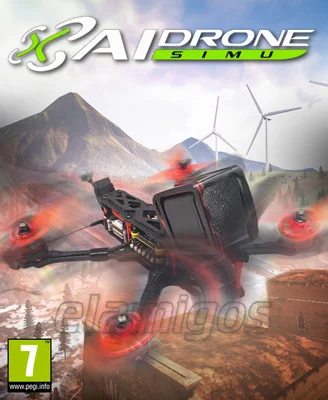
- Category:
- Release date:
- Game Genre:Simulation, Flight, First-Person, Artificial Intelligence, Immersive Sim, Physics, Level Editor, 3D, 6DOF, Combat Racing, Realistic, Robots, Science, Crafting, Open World, Singleplayer
- Developer:Diophante Studio, Publisher: Diophante Studio
- Release:ElAmigos
- Platform:PC
- Languages (subtitles):English, French, Italian, German, Spanish
- Crack:Codex
- Game size:23.44GB
Game Description
AI Drone Simulator on PC is a hardcore first-person FPV drone simulation from Diophante Studio, built around realistic flight control, repeatable practice, and creative sandbox flying. The current Steam listing still uses the original name, with no verified rebrand or replacement edition. Its strongest hooks are Blackbox drone import, dynamic environments, editable maps, and community-shared aircraft, tracks, and locations.
This is not an autonomous-drone strategy game despite the AI wording in its title and store tags. The player pilots the drone directly, using an FPV camera and configurable control setup to learn lines, manage momentum, and recover from mistakes without risking a physical quadcopter.
FPV flight built around precision
The core loop is straightforward: choose a drone, select a map or track, configure the flight behavior, and practice until your route becomes consistent. Free flight provides space to explore, while races and time attack formats give experienced pilots a measurable target.
AI Drone Simulator uses a first-person camera that keeps the emphasis on orientation, throttle control, pitch, roll, yaw, and collision awareness. A narrow gap or fast approach is not solved by an upgrade or an ability. It is solved through better control, cleaner lines, and understanding how the drone reacts when speed and altitude change.
The game is designed to accommodate both newcomers and experienced FPV pilots. Default settings offer a practical starting point, while advanced precision settings let players tune the handling more closely to their preferences. The result is a simulator where improvement comes from repetition rather than character progression.
Blackbox import and drone customization
One of the game's most distinctive systems is Blackbox import. Players can bring flight data from a compatible real-world drone into the simulator and use it to create a virtual representation of their aircraft. That makes the practice loop more personal than simply selecting a generic drone from a menu.
Imported models remain configurable, and the game also includes preset aircraft as starting points. The emphasis is not on collecting increasingly powerful machines. Instead, the value comes from adjusting a drone until its response feels familiar, then building muscle memory through repeated flights.
Community content expands the customization layer. Steam Workshop support allows players to share or download community drones, maps, and tracks, so the available flying spaces are not limited to the default package. The quality and style of Workshop content can vary, but the system gives the simulator a useful long-tail ecosystem.
Dynamic environments and the in-game editor
AI Drone Simulator includes more than 18 maps with moving environmental elements such as cars, trains, planes, and animals. These details turn otherwise familiar practice areas into changing flight spaces where timing and route selection matter.
Players can follow moving vehicles, enter moving trains, thread through industrial areas, or practice tight maneuvers around natural and built obstacles. The environments are not just decorative backdrops. Their scale and moving objects create opportunities for chase lines, precision passes, and risky freestyle routes.
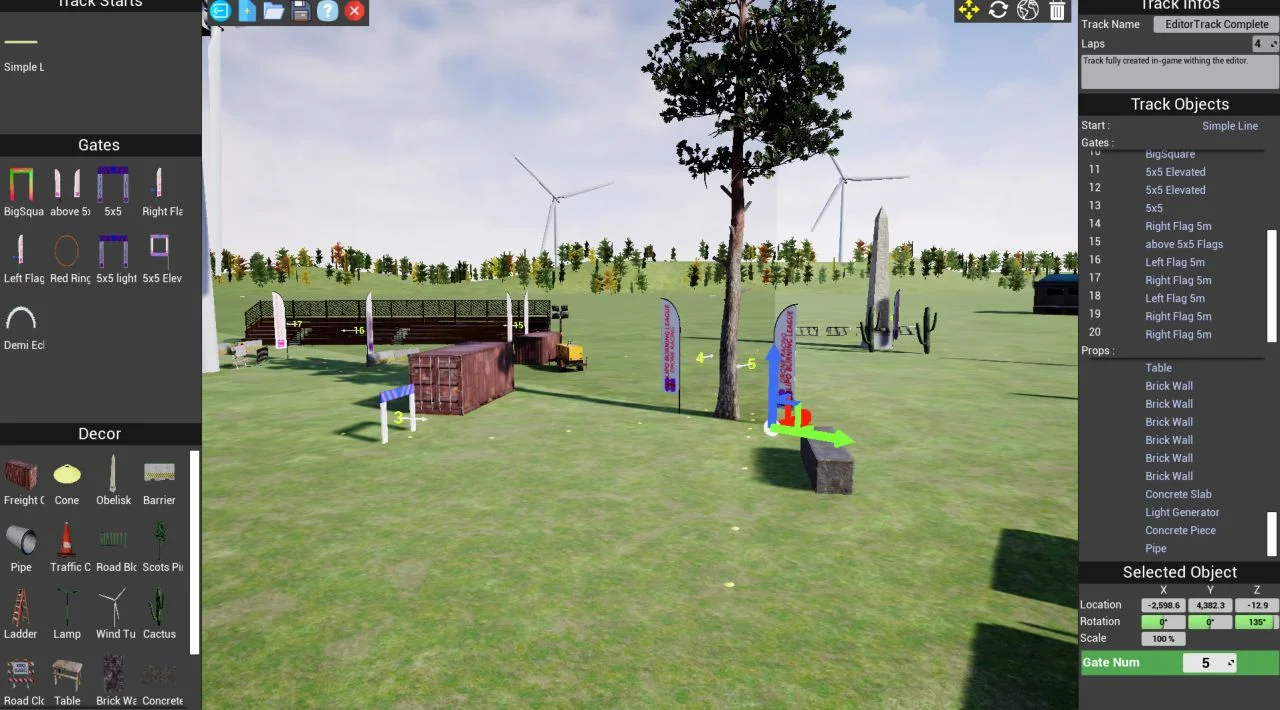
The built-in editor is a major reason to keep returning after the initial learning period. You can design custom tracks, place objects, and create personal flying spots, then share them with the community. The editor also supports importing PNG images and 3D models, while the game advertises support for importing custom Unreal Engine maps.
This structure gives the game two connected identities: a technical practice tool for pilots and a creative environment for players who enjoy designing challenges. Someone focused on racing can build gates and routes, while a freestyle player can create obstacle-heavy spaces designed around dives, gaps, and close passes.
Content model and current PC package
The base game is sold as a paid PC title through Steam. The current store page lists single-player functionality, Steam Achievements, Steam Workshop, Steam Leaderboards, Family Sharing, and the included level editor.
The Steam content listing currently shows a free NYC 1950s Map add-on. Beyond that, the verified storefront information does not present a season pass, a free-to-play transition, or a large licensed expansion program. The main content value comes from the included maps, aircraft customization, editor tools, and Workshop library.
There is no story campaign or conventional unlock tree to define long-term progression. The meaningful progression is pilot improvement: learning the handling model, refining a route, lowering a time, and creating or discovering more demanding community tracks.
Controllers, radio transmitters, and localization
AI Drone Simulator supports flexible PC input, including Windows-recognized controllers, while a compatible FPV radio transmitter is the most natural choice for players who want a control layout closer to physical drone flying. A standard game controller can make the game more accessible, but transmitter-style input better suits pilots practicing throttle and directional coordination.
Control settings are important because the simulator is built around fine adjustments rather than broad arcade steering. New players should begin with the default configuration, then change response and precision options gradually instead of altering every setting at once.
The verified Steam listing provides interface localization in English, French, Italian, German, Spanish, and Simplified Chinese. Full audio and subtitle support are not listed as separate features, so the confirmed localization is interface text rather than a voiced presentation.
Steam is the confirmed storefront and platform ecosystem for the PC version. The available store information does not verify a separate launcher, dedicated server tools, anti-cheat system, VR support, or cabinet-specific features, so those should not be assumed.
Who AI Drone Simulator suits best
This is a strong fit for players who want realistic FPV physics, practice-oriented flying, transmitter support, and a large amount of user-created content. It is particularly appealing to hobbyists who want to rehearse routes, test a virtual version of their own drone, or improve control before flying outdoors.
It also works for PC players who enjoy mastery loops. A successful session may involve repeating one difficult gap, experimenting with a different drone setup, or comparing a clean run against a Steam leaderboard result.
Players looking for weapons, missions, dramatic aerial combat, or a narrative campaign should look elsewhere. For mission-focused flight action, arcade combat flight games such as Air Conflicts Collection offer a very different structure, with aircraft battles and objective-driven scenarios instead of FPV freestyle practice.
Similar FPV games on PC
The closest comparisons are other dedicated FPV simulators such as Liftoff and Uncrashed. The shared appeal is direct drone control, racing or freestyle practice, and learning through repeated flights rather than traditional character progression.
AI Drone Simulator stands apart through its focus on Blackbox data, editable environments, moving map elements, and the ability to import custom Unreal Engine maps. Players who value community creation and personalizing the virtual aircraft may find more to explore here than in a simulator centered mainly on stock tracks.
It is also more specialized than broad aviation games. The camera stays close to the drone, the routes are built around precision, and the challenge comes from controlling a small aircraft through tight spaces at speed.
AI Drone Simulator FAQ
Has AI Drone Simulator been renamed?
No verified storefront rebrand has been found. The current Steam listing continues to use the name AI Drone Simulator, and no confirmed “Classic,” “Definitive,” or replacement edition appears on the checked storefront information.
Is AI Drone Simulator free to play?
No. The base game is listed as a paid Steam title. The current content listing also shows a free NYC 1950s Map add-on, but that does not change the commercial model of the main game.
Does AI Drone Simulator support multiplayer?
The confirmed Steam feature list identifies the game as single-player. It supports Steam Workshop and Steam Leaderboards, but the verified storefront data does not advertise online multiplayer, local co-op, or split-screen play.
Can I import my real drone into the simulator?
Yes. The game supports Blackbox file import, allowing players to create a virtual copy of a compatible real-world drone from recorded flight data. The resulting model can then be used with the simulator's physics and customization options.
Can I use an FPV radio transmitter?
Yes. The store description identifies support for flexible Windows input and recommends a radio transmitter for the most authentic control experience. The exact compatibility depends on whether the transmitter is correctly recognized by Windows.
Does it include a level editor?
Yes. The game includes an in-game level editor for creating maps and tracks, with support for placing objects and importing PNG images and 3D models. Players can also share creations through Steam Workshop.
What is the real progression structure?
Progression is based on pilot mastery, not a story campaign or character leveling system. Players improve by learning flight behavior, completing races and time attacks, lowering personal times, practicing free flight, and building more demanding custom routes.
System Requirements
Minimum: | Recomended: |
| Processor: Intel Core i3 8100 or AMD Ryzen 3 2200G Graphics: AMD RX 570 or Nvidia GTX 1050 Memory: 4 GB RAM Disk space: 35 GB HDD Operating system: Windows 7 | Processor: AMD Ryzen 5 3600XT or Intel Core i5 9600K Graphics: Nvidia GTX 1650 Super or AMD RX 5500-XT Memory: 8 GB RAM Disk space: 35 GB HDD Operating system: Windows 10 |
Screenshots


Trailer/Gameplay
Download
AI Drone Simulator / AIDroneSim (2021), 23.44GB
ElAmigos release, game is already cracked after installation (crack by Codex).

Updated to version 1.14 (20.07.2021).
Change language in game options.

1. Extract files.
2. Burn or mount the image.
3. Install the game.
4. ElAmigos release, game is already cracked after installation.
5. Play the game. If you like this game, BUY IT!
AI Drone Simulator / AIDroneSim Download
🔒 Premium access required
To see and use the download links, you must be logged in and have an active PREMIUM account.
* Unlock downloads via Torrent and TeraBox.
Torrent Download
The best torrent download speeds are with qBittorrent!